Is Your Home in Kensho Residence Finally Getting Fast Internet?
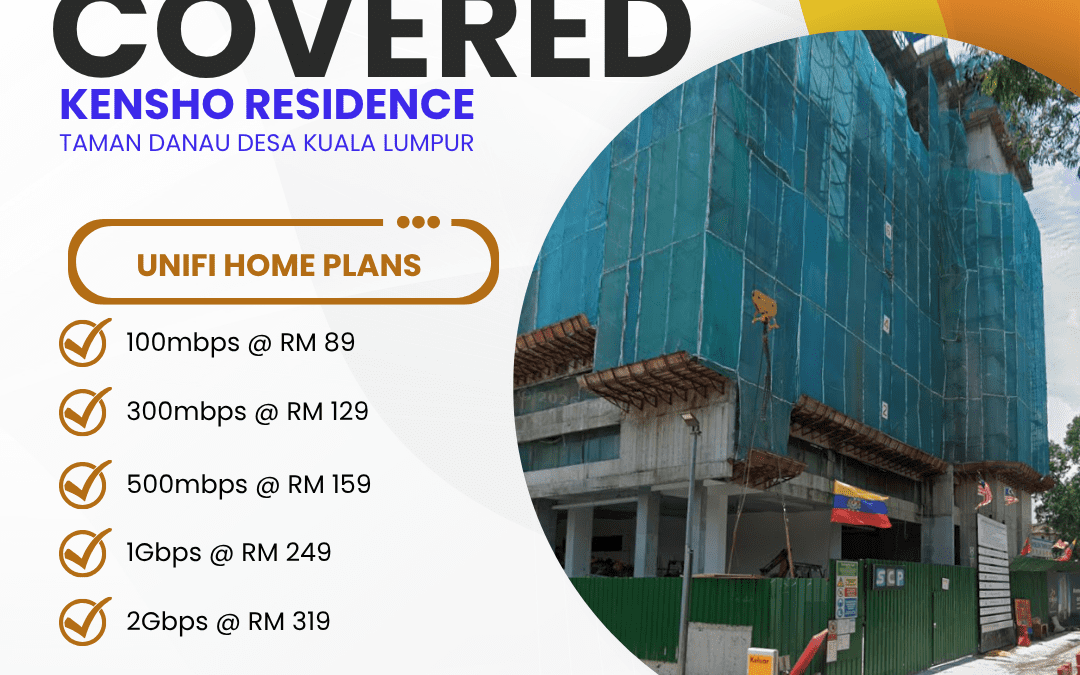
If you live in Kensho Residence, Taman Danau Desa, Kuala Lumpur, the wait is over. Unifi Home Fibre has officially covered your area, and that means you now have access to one of Malaysia’s most reliable broadband services — right at your doorstep.
Whether you work from home, stream on multiple devices, game online, or simply want an internet connection that actually keeps up with your household, this is the news you’ve been waiting for.
Why Unifi Home Fibre Is the Right Choice for Kensho Residence Residents
Internet connectivity is no longer a luxury — it’s a daily necessity. From attending video calls and submitting work reports to streaming your favourite shows on Netflix or helping your kids with online homework, your home internet has to perform.
Unifi Home Fibre delivers fibre-optic broadband directly to your residence, which means faster speeds, more stable connections, and significantly less lag compared to traditional cable or wireless alternatives. With fibre technology, the bandwidth does not degrade based on how many neighbours are also online — a common problem in older broadband infrastructure.
For residents of Kensho Residence in Taman Danau Desa, this coverage marks a turning point in how you experience the internet at home.
Unifi Home Plans Available at Kensho Residence
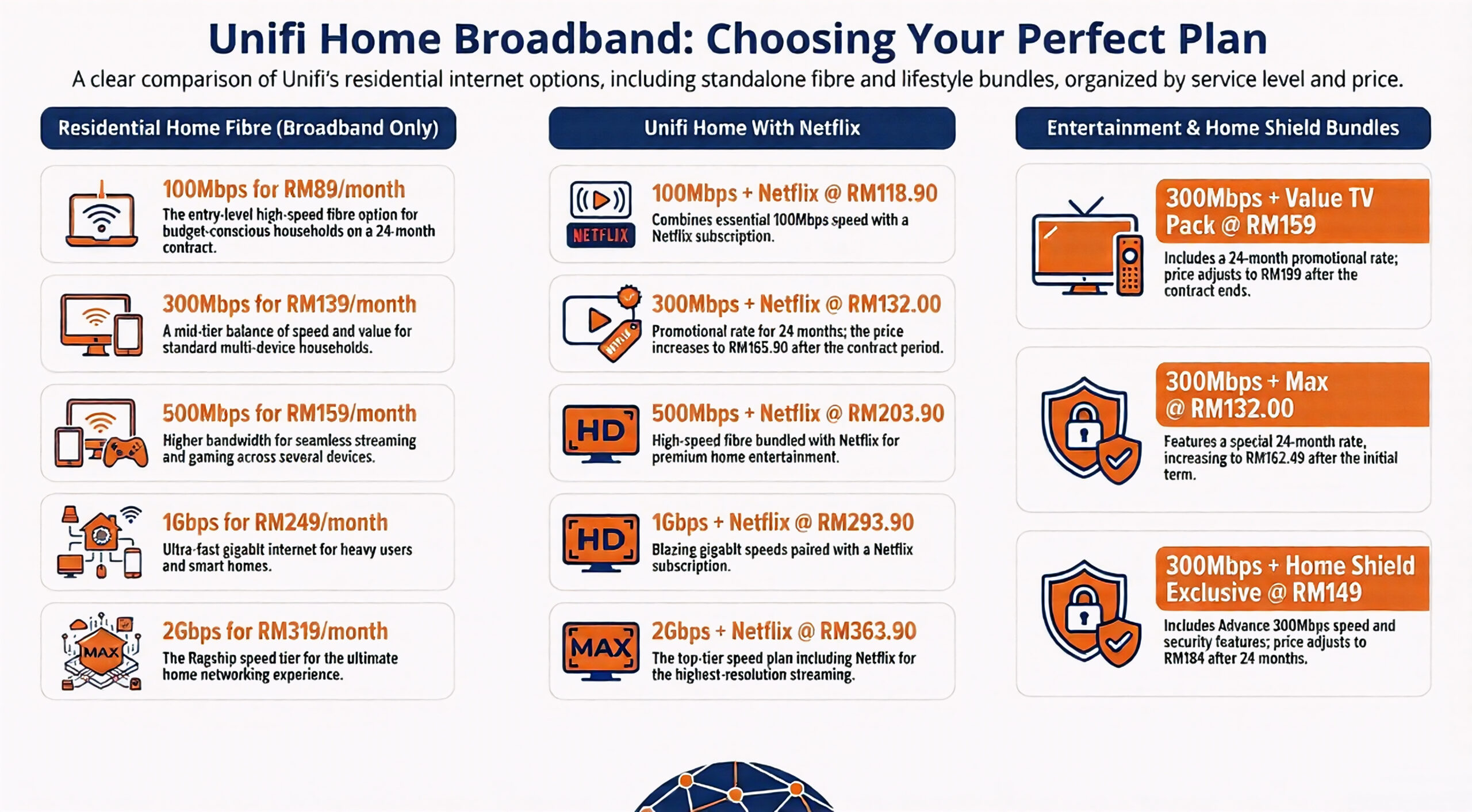
Unifi offers a range of plans to suit different household sizes, usage habits, and budgets. Here is a full breakdown of what is currently available:
Unifi 100Mbps — Ideal for light users, couples, or small households who primarily browse, stream in HD, and use social media. This entry-level plan keeps things affordable while providing a stable connection.
Unifi 300Mbps — A popular choice for families with multiple devices running simultaneously. Suitable for HD and Full HD streaming, video conferencing, and casual gaming without interruption.
Unifi 500Mbps — Perfect for households with heavy internet usage, remote workers, content creators, or anyone who frequently uploads or downloads large files. This plan handles multiple 4K streams without breaking a sweat.
Unifi 1Gbps — A powerhouse plan for smart homes, power users, and households that demand top-tier performance across all devices simultaneously. Gaming, 4K streaming, cloud backup, and video calls all run at the same time with ease.
Unifi 2Gbps — The ultimate home broadband plan for tech-savvy households, home offices, or anyone who simply refuses to compromise on speed. Future-proof your home with the fastest residential broadband plan available in Malaysia.
What Makes Living in Kensho Residence Even Better Now
Kensho Residence is already a sought-after address in Taman Danau Desa — a well-established neighbourhood in Kuala Lumpur known for its connectivity to major highways, accessibility to amenities, and vibrant community living. Adding Unifi Home Fibre to the mix makes it an even more attractive place to call home.
Property value tends to increase when an area has reliable high-speed broadband infrastructure. Buyers and renters today actively look for homes with fibre broadband coverage. If you are a property owner at Kensho Residence, being in a Unifi-covered zone is a genuine selling point.
For families, the ability to have multiple people working, learning, and entertaining simultaneously — without one person’s usage dragging down the others — is a major quality-of-life improvement.
How to Sign Up for Unifi at Kensho Residence
Getting connected is straightforward. Here is how you can get started:
- Visit the official Unifi website at unifi.com.my and enter your address to confirm coverage.
- Select the plan that best matches your household needs.
- Choose your preferred installation date.
- A Unifi technician will come to your unit and complete the setup, typically within a few business days.
You can also call Unifi customer support at 100 or walk into any TM Service Centre for assistance with your registration.
Do Not Miss Out — Act Now
Coverage availability can vary even within a residential development. Just because Kensho Residence is now listed as a Unifi-covered area does not mean every unit will always have immediate installation slots available. Demand in newly covered areas tends to be high, and early registrations are typically processed first.
If you have been holding off on upgrading your internet, this is your moment. The longer you wait, the longer you go without the stable, high-speed connection your household deserves.
Register today at unifi.com.my or call 100 to secure your installation slot.
Frequently Asked Questions (FAQ)
Is Unifi Home Fibre available for all units in Kensho Residence? Unifi coverage at Kensho Residence, Taman Danau Desa is confirmed, but it is recommended to verify your specific unit via the Unifi website or by calling 100 to ensure installation is available for your floor or block.
Which Unifi plan is best for a family of four? For a family of four with moderate to heavy internet usage, the 300Mbps or 500Mbps plan is generally recommended. If multiple people work from home or stream in 4K, the 500Mbps or 1Gbps plan would serve you better.
How long does Unifi installation take? Installation is typically completed within 3 to 7 working days after registration, depending on appointment availability and technician scheduling in your area.
Is there a contract period for Unifi Home plans? Most Unifi Home plans come with a 24-month contract. Early termination fees may apply if you cancel before the contract ends. Check the latest terms on the Unifi website for the most current details.
Can I upgrade my plan after signing up? Yes, Unifi allows plan upgrades. You can contact Unifi customer support at 100 or log in to your MyUnifi account to request a plan change.
Does Unifi provide a router with the subscription? Yes, Unifi includes a modem-router device as part of the standard home package. Advanced router options may be available at an additional cost.
What happens if I face connection issues after installation? You can report service disruptions via the MyUnifi app, through the Unifi website, or by calling 100. Unifi technicians will be dispatched for on-site support if the issue cannot be resolved remotely.